
Every list adds another “must-have”
Registries, saved carts, screenshots, group chats, and checklists all add items. Your family's timing, space, and budget decide which are useful now — and which can wait.
A mobile app for expecting & new parents
Wherever your baby-gear ideas live, bring them all. They might have started in wishlists, registries, retailer carts, checklists, screenshots, group chats, or notes — on Babylist, Amazon, Target, or somewhere else. Don’t Buy That Yet: Baby cleans up the pile usingyour due date, space, and budget. Every item gets a clear verdict:keep, cut, delay, buy used, or buy new.
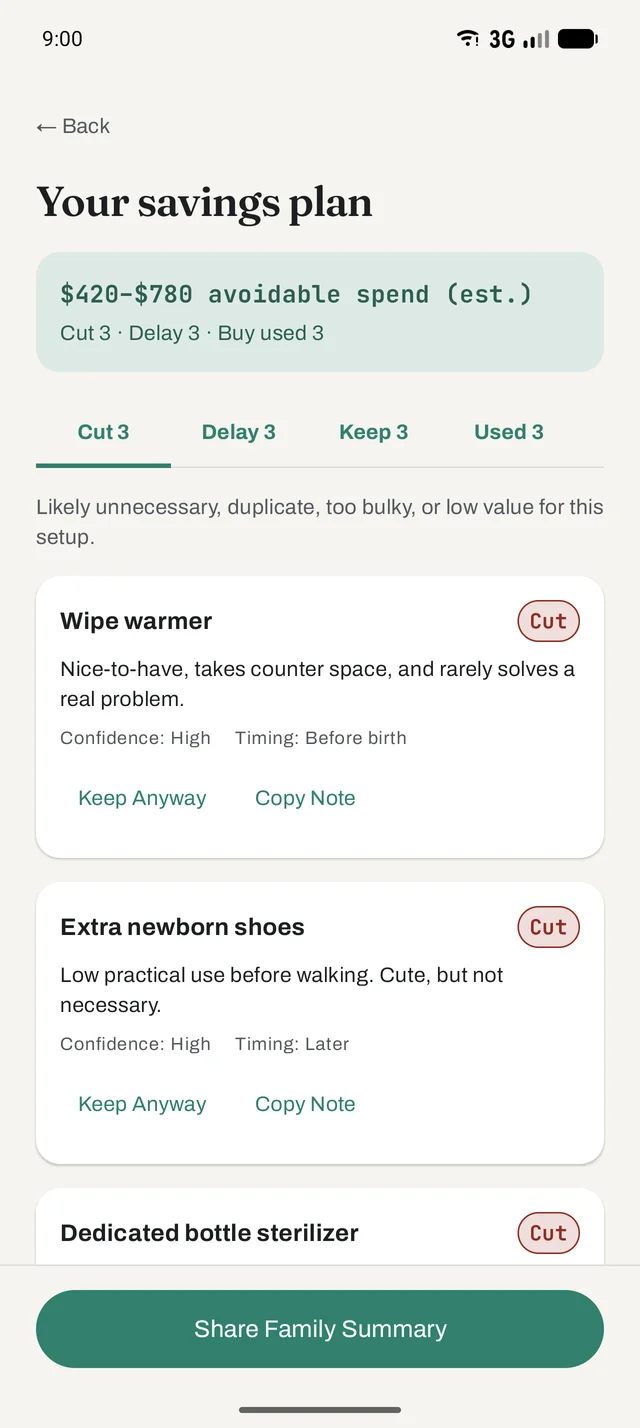
Real sample plan from the live Android app
The problem
Wishlists, registries, carts, group chats, saved reels, well-meaning grandparents — the pressure comes from everywhere at once, and it all sounds urgent.
Registries, saved carts, screenshots, group chats, and checklists all add items. Your family's timing, space, and budget decide which are useful now — and which can wait.
Every list is someone's fifteen essentials. Combined, even useful suggestions can make the cart feel less like a plan and more like another source of pressure.
Your mother swears by the wipe warmer. Your friend says skip the bassinet. They're both right — for their baby, their home, their year.
Late-pregnancy shopping can be about feeling ready as much as products. Checking off another item can feel like preparation, even when the timing is not right yet.
Here's the thing: most of those purchases aren't wrong.
They're just premature.
Product preview
Pick a product, answer three questions about your situation, and get the kind of decision brief the app produces — buy, wait, borrow, buy used, or skip, with the reasoning attached.
Sample logic. This preview runs a small, fixed rule set in your browser to show the shape of an app audit — the mobile app weighs more context than three questions. Decision support only; not medical, safety, or professional advice.
How we decide
Each recommendation looks at the product through these same lenses and shows you the reasoning, so you can disagree with it intelligently.
Car seats, sleep surfaces, anything load-bearing: the conservative answer wins before any other criterion gets a vote. Money never argues with safety here.
A bassinet works for months; a stroller for years; newborn clothes for weeks. The shorter the window, the harder a purchase has to justify itself.
Daily-use items earn real budget. Items used twice before the drawer claims them do not — no matter how highly they're rated.
Sometimes something you already own can cover the need while you learn your routine — a bowl of warm water can warm a bottle, and a fan can provide background noise. Existing options deserve consideration before adding a specialized product.
Every item also costs the floor and outlet it occupies. In a small home that price is real, and the verdict accounts for it.
Sticker price divided by the actual window. A $300 item used daily for four years is cheap; a $40 item used twice is expensive.
Many baby products have a short first-owner window. Strong resale supply and lending circles can change the right answer for whole categories.
Some answers depend on a baby you haven't met — feeding preferences, sleep temperament. When we can't know yet, the verdict says wait, not guess.
How the app works
This is the real flow from the live Android app, not a marketing mockup.
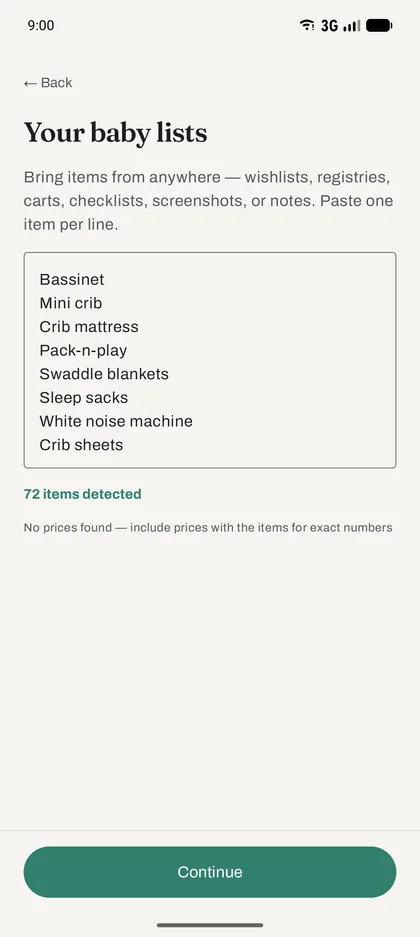
Pull items from wishlists, registries, carts, checklists, screenshots, group chats, or notes. Add one item per line; no retailer connection is required.
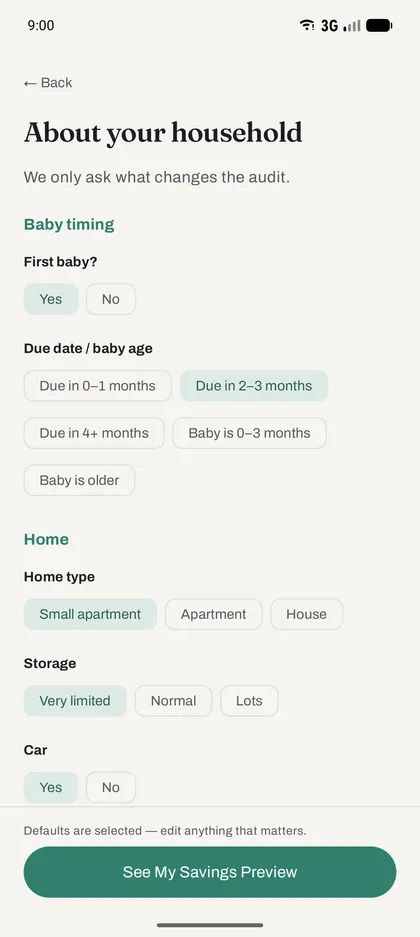
Tell the app about your timing, home, storage, budget, and comfort with used gear. Most answers are pre-filled; edit what matters.
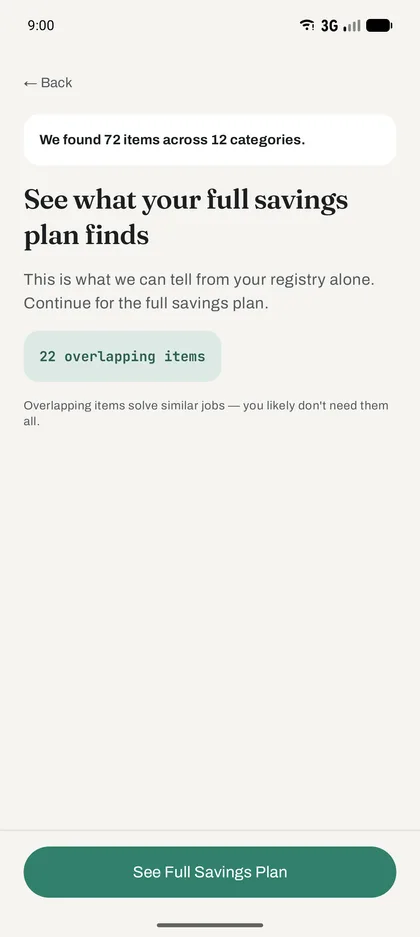
Before you pay, see how many items the app found, which ones overlap, and what the full plan can help you untangle.
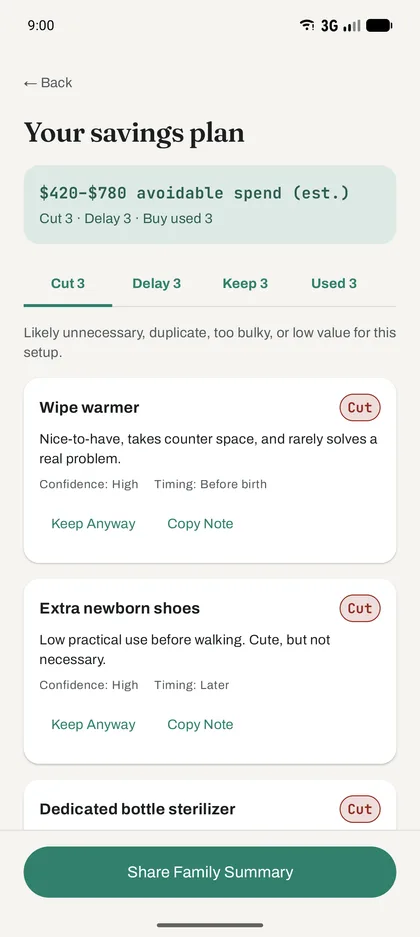
Review every keep, cut, delay, and buy-used call with its reasoning and timing, then copy a family-ready summary.
Available now
Coming soon
Upcoming reminders will turn “not yet” into a plan you do not have to keep in your head. Optional nudges will surface delayed items when their useful window opens — with controls to mute one item, one window, or every send.
Available now: an optional notification when your audit is finished.
Coming up
In about 3 months
High chair
Useful later, but usually not needed in the newborn phase.
Preview only — scheduled item reminders are not in the current store build.
The first app
Built for the nine months of maximum buying pressure — and the first year after, when you find out what you actually use. It's the first product in the Don’t Buy That Yet family, and the one we're most opinionated about.
Baby gear has patterns: things that matter on day one, things that matter at month four, and things that become useful only after routines are clear. The app considers baby-specific timing, safety boundaries, and use windows instead of giving generic shopping advice.
For safety-critical items — car seats, sleep surfaces — the app is deliberately conservative. Verify current standards, product history, recalls, and installation; when those cannot be verified, choose new.
Your due date, your space, your climate, whether it's your first — the same bassinet can be a “buy carefully” for one family and a “borrow” for another.
Things the app has opinions about:
Where we stand
The app helps you decide when and whether to buy things. It is not a pediatrician, and it will never pretend to be one. Health and safety questions belong with your doctor and official safety guidance.
Car seats, sleep surfaces, anything safety-critical: the app defaults to the cautious answer. Saving money is never the recommendation when safety is the question.
Parents buy things. That's fine — good, even. The app exists to improve timing and confidence, not to score points for spending the least.
Already bought the wipe warmer? Nobody's keeping score. The goal is less regret and calmer decisions from here forward, not an audit of your past.
Don’t Buy That Yet: Baby is available now on the App Store and Google Play. The sample check above shows exactly how the app thinks.
FAQ
No. Parents need things, and buying them should feel good. The app's job is timing and confidence: buy the right things when they're actually useful, and skip the purchases you'd quietly regret. An audit can absolutely end in “yes, buy it now.”
Not at all. If you want the full nursery, the app helps you sequence it instead of buying it all in week 28. Minimalism is an aesthetic; this is logistics.
No. The app is deliberately conservative on safety-critical items like car seats and sleep surfaces, but current official guidance should decide safety questions. For health questions, talk to your pediatrician.
You're not alone. You can audit what you own: the app helps you decide what to return, what to keep boxed for later, and what to stop feeling bad about. No scorekeeping.
The app is available now for iPhone on the App Store and for Android on Google Play.
That's honestly the best time. Bring the lists you already have — a template checklist, saved carts, screenshots, notes, or recommendations from family — and use the audit to decide what belongs in the final plan.
Yes. The pressure doesn't stop at delivery — it just changes categories. The app keeps helping through the first year, when “delay” items come due and new pressure builds for things you skipped.
That reminder offering is coming soon: optional nudges when an item's useful window opens, with controls to mute one item, one window, or every send. Available now, you can opt into a notification when your audit finishes.